Contents
- Index
Signal Generator
Index
With most computers, OmniMic can be used to directly play test signals such as the sweeps for Frequency Response or Harmonic Distortion. The signal is generated from the computer's soundcard output, which can be connected via cabling to other amplifiers or audio systems.
When OmniMic is used in the SPL/Spectrum mode or Oscilloscope mode, it can also generate sine wave or square wave test tones. To use this function, select the "Config">"Generator" menu and this form will appear:
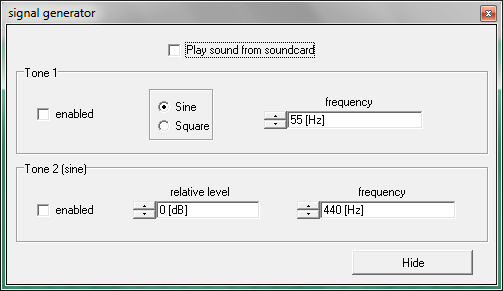
There are two tone generators included, either (or none) of which can be used simultaneously.
Tone1 can be either a sine wave or a square wave of any audio frequency and is always at a fixed level -- this level is the same (when a sine wave) as the level at which sweep tones are output from the soundcard when sound is played out in the Frequency Response, Distortion, Reverb or Bass Decay.
This provides a handy way to provide known signal level to loudspeakers under test. With Tone1 set to about 55Hz sine wave (from the Generator or the button on the Souncard Play Adjust form,) and applied to a power amplifier which is in turn connected to an AC Voltmeter or DVM set to AC Voltage mode, adjust the amplifier's volume control to the desired voltage level. For loudspeaker sensitivity measurements, this is normally a voltage level of 2.83Vrms (equal to 1W into an 8 ohm load). Then change over to the Frequency Response page, connect the speaker, and with the soundcard again providing the test tone measurements will be at the 2.83V standard level.
Square wave mode with Tone1 can be used to view (on the Oscilloscope) the response of speakers to a square wave. Be aware, however, that very few loudspeakers can produce a recognizable square wave over any range of frequencies. Also, as the measurement system operates between 5Hz and 20kHz or 40kHz (and square-looking waves require from 1/10 to 10x the square wave frequency), only square waves between about 50Hz and 2kHz (or 4kHz) could approach ideal appearance. There is little if any evidence that ability to reproduce a square wave is audible, but the characteristic can still be interesting.
Tone2 is always a sine wave, and both its level and frequency can be adjusted as desired. Its output level (in dB) is relative to the level of Tone1, that is, when the relative level is set to 0dB, then Tone2's level is the same as Tone1's level. Application of the two tones simultaneously can be used to conduct frequency-pair intermodulation tests of loudspeakers, viewing the level of intermodulation product frequencies on the FFT Spectrum Analyzer (in the Spectrum/SPL tab page). When doing this, however, be aware of complications from sound reflections in the room -- such tests are best done with the microphone close to the speaker (if the total SPL level is less than about 110dBSPL or 145dBSPL with OmniMic40k) or outdoors where reflections can be avoided.
Test signals generated by the OmniMIc software can also be saved to WAV files for playing from external audio hardware.